

Why is your website not ranking on Google? If you’ve built a website, added your services, published some content and expected customers to find you through Google, it can be frustrating when your website barely appears in search results or doesn’t appear at all.
It is tempting to assume that you need more keywords, more blog posts or more backlinks. But poor Google rankings can have many different causes. Your pages may not be indexed, your content may not match what people are searching for, your website may have technical problems, or you may simply be competing for searches that are difficult to win.
The first step is not to change everything. It’s to find out what is actually preventing your website from gaining visibility.
Here are 12 SEO problems worth checking if your website isn’t ranking on Google.
1. Your Website or Page Isn’t Indexed
Before worrying about rankings, check whether Google has actually indexed the page.
Indexing and ranking are not the same thing.
Indexing means Google has discovered and stored a page in its search index. Ranking determines where that page may appear when someone searches for a relevant query.
If an important page isn’t indexed, it cannot rank in Google’s normal search results.
This can happen because of technical settings, indexing instructions, crawling problems or because Google has not yet discovered the page.
How to check
Google Search Console provides tools for checking the indexing status of individual URLs.
Inspect important pages such as:
- Your homepage
- Main service pages
- Product pages
- Important location pages
- Recently published articles
If a page is not indexed, investigate the reason before spending time rewriting its content.
A page can’t rank if Google isn’t able to include it in its index.
2. Your Website Is Too New
A new website can be perfectly healthy and still struggle to rank.
Established competitors may have years of content, links, brand recognition, customer reviews and search visibility behind them. A new domain has to build its presence over time.
This is especially noticeable when targeting competitive searches.
For example, a new plumbing business may find it difficult to immediately rank for:
“plumber”
across an entire city.
A more specific search such as:
“emergency plumber in Sandton”
may be more relevant and potentially more achievable, depending on the competition.
That doesn’t mean a new website should simply wait for Google to “trust” it.
Use the early stages to build a strong SEO foundation:
- Create useful service pages
- Target relevant searches
- Publish helpful supporting content
- Build internal links
- Establish your business information
- Earn legitimate mentions and links
- Improve the technical quality of the website
- Monitor performance in Search Console
SEO tends to become stronger as a website develops useful content, relevance and authority.
3. Your Page Doesn’t Match Search Intent
One of the most overlooked SEO problems is search intent.
Search intent is the reason behind a person’s search.
Someone searching:
“how does VAT registration work?”
is probably looking for information.
Someone searching:
“VAT registration services Pretoria”
is more likely looking for a provider.
Those searches may contain related words, but they require different types of pages.
If you create a highly promotional service page for someone looking for educational information, it may not satisfy their needs.
Likewise, if someone is ready to hire a service and your page only provides a general explanation of the topic, you may not give them what they’re looking for.
Before targeting a keyword, ask:
- What is the searcher trying to accomplish?
- Are they looking for information or a service?
- Are they comparing options?
- Are they looking for a local provider?
- What questions are they likely to have?
- What type of pages are currently appearing for the search?
Don’t create a page simply because a keyword has search volume. Create the type of page that best satisfies the search.
4. Your Content Doesn’t Give People a Reason to Choose It
Adding a keyword to a page doesn’t automatically make the page useful.
A page can technically contain the right keywords while providing very little value.
For example, imagine two websites targeting:
“business accountants Pretoria”
One page contains several paragraphs repeating the phrase “business accountants Pretoria.”
The other explains:
- Which businesses the accountants work with
- What accounting services are provided
- How the process works
- What problems they solve
- What qualifications or experience the professionals have
- What customers should consider before choosing an accountant
- How to get started
The second page gives both users and search engines much more meaningful information.
Good SEO content should be specific, useful and written for the people who will actually read it.
Don’t add information just to make a page longer.
Instead, ask:
“If I were the customer searching for this, would this page answer the questions I actually have?”
That is a much better starting point than asking how many times you can use a keyword.
5. You’re Targeting the Wrong Keywords
Sometimes a website isn’t ranking because the SEO strategy is focused on the wrong searches.
Search volume can be misleading.
A keyword receiving thousands of searches may sound attractive, but if those searches don’t come from your target customers, ranking for it may produce little business value.
Consider a local graphic designer.
Trying to rank nationally for:
“graphic design”
could be extremely competitive.
A more specific strategy might target searches related to:
- Logo design in Johannesburg
- Business branding Johannesburg
- Corporate graphic design
- Packaging design services
- Graphic design for small businesses
The right keywords depend on the business, location, audience, competition and commercial goals.
Good keyword research considers more than volume
Look at:
Relevance + intent + competition + location + business value
A smaller search with strong buying intent can be more valuable than a high-volume search from people who will never become customers.
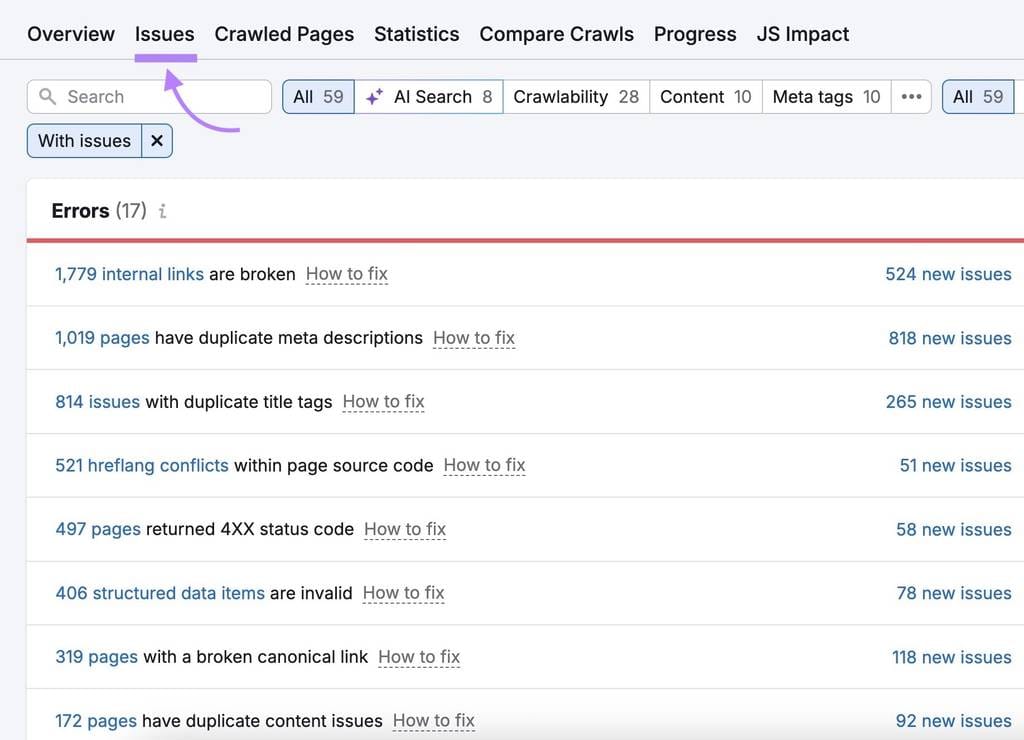
6. Your Website Has Technical SEO Problems
Technical SEO concerns the parts of your website that help search engines crawl, understand and access your content.
Some problems are easy to spot. Others aren’t.
Potential technical issues include:
- Broken links
- Incorrect redirects
- Duplicate URLs
- Incorrect canonical tags
- Poor URL structures
- Sitemap problems
- Pages accidentally blocked from crawling
- Incorrect indexing instructions
- HTTPS problems
- Poor website architecture
- Rendering problems
- Orphaned pages
A website can look perfectly normal to a visitor while still having technical problems underneath.
This is why technical SEO audits can be useful when a website has unexplained visibility problems.
However, don’t assume that every website needs complicated technical changes.
Good technical SEO is ultimately about making a website accessible, understandable and usable for both search engines and people.
7. Your Website Is Slow or Difficult to Use
Your website doesn’t exist solely for search engines.
People have to use it.
If visitors land on a page that takes too long to load, is difficult to navigate or doesn’t work properly on mobile, they may leave before taking the next step.
Check your website on:
- Mobile phones
- Tablets
- Desktop computers
- Different browsers
- Different internet connections
Look for practical problems such as:
- Slow-loading pages
- Layout shifts
- Difficult navigation
- Tiny text
- Buttons that are difficult to use
- Intrusive pop-ups
- Images that aren’t optimised
- Forms that don’t work correctly
Google’s Core Web Vitals provide specific measurements for important aspects of loading performance, responsiveness and visual stability.
But don’t make the mistake of believing that a perfect performance score automatically produces high rankings.
A technically fast website still needs useful content, relevance, authority and a good overall experience.
8. Your Website Doesn’t Have Enough Relevant Content
A website with only a handful of generic pages can make it difficult to demonstrate the full range of topics, services and questions associated with a business.
For example, an accounting firm might provide:
- Bookkeeping
- Payroll
- Tax returns
- VAT services
- Business registration
- Compliance services
Trying to explain all of those services on one page can create a poor experience for both users and search engines.
Dedicated pages allow each service to be explained properly.
Those pages can then be supported by useful educational content.
For example:
Tax Return Services
could be supported by articles such as:
- What documents do I need for a tax return?
- What happens if I submit my tax return late?
- Who needs to submit a tax return?
- Common tax return mistakes to avoid
The same principle works across industries.
A dentist might publish guides about different treatments.
A web designer might explain website costs and common website problems.
An ecommerce business might publish buying guides.
A construction company might explain different building processes.
The goal is not to publish content simply to “feed Google.”
Build content that answers questions your potential customers genuinely ask.
9. Your Internal Linking Is Weak
Internal links are links between pages on your own website.
They help visitors move between related information and help search engines understand how your pages are connected.
For example, an article explaining how to choose an accountant could naturally link to a relevant accounting services page.
A guide about choosing running shoes could link to relevant product categories on a sports retailer’s website.
A web design article could link to a page explaining website maintenance services.
The important word is naturally.
Don’t add dozens of internal links just because you’ve heard they are good for SEO.
Instead, ask:
“Would this link help someone who is reading this page?”
Your most important pages should generally be easy to reach through sensible navigation and contextual internal links.
10. Your Website Hasn’t Built Enough Authority
Ranking isn’t only about what you publish on your own website.
Search engines can also use information from across the web to help understand websites and their reputation.
Relevant links and genuine mentions from other websites can contribute to a site’s authority.
However, this doesn’t mean you should buy hundreds of backlinks or use automated link-building schemes.
Artificial link-building can create serious SEO risks. Google’s spam policies specifically address manipulative practices intended to influence search rankings.
A better approach is to earn recognition naturally.
Depending on your industry, this could include:
- Industry publications
- Professional organisations
- Local business directories
- Partnerships
- Supplier relationships
- Community organisations
- Genuine media coverage
- Original research
- Useful resources other websites want to reference
The key is relevance and credibility, not simply the number of links.
11. Your Website Doesn’t Clearly Demonstrate Trust
A visitor needs to know more than what you sell.
They also need to know who they’re dealing with.
This is particularly important when your services involve someone’s money, business, legal affairs, health, education or other important decisions.
Your website should make appropriate information about the business and people behind it easy to find.
Depending on your industry, useful trust information may include:
- An About page
- Real business contact details
- Professional qualifications
- Relevant experience
- Team information
- Customer reviews
- Case studies
- Examples of previous work
- Clear service descriptions
- Business location
- Professional memberships
- Appropriate author information
Don’t add credentials simply as decoration.
Explain them in a way that helps the reader understand why they matter.
For example, saying that someone has a professional qualification is useful. Explaining how that expertise helps customers make better decisions is even more useful.
Google’s broader guidance around creating helpful, reliable, people-first content also makes clear that websites should focus on providing value to people rather than creating content primarily to manipulate search rankings.
12. You’re Expecting SEO to Work Without Ongoing Improvement
SEO isn’t usually a one-time website task.
You can optimise a page today and still discover opportunities to improve it later.
Your competitors may publish better content.
Search behaviour may change.
Your business may introduce new services.
Your rankings may reveal keywords you weren’t originally targeting.
Search Console data may show that a page is receiving thousands of impressions but very few clicks.
These are opportunities to investigate.
Monitor what is actually happening
Pay attention to:
- Search impressions
- Organic clicks
- Search queries
- Average position
- Pages receiving traffic
- Pages losing visibility
- Click-through rates
- Indexing issues
- Technical errors
For example, a page appearing for a large number of searches but receiving very few clicks may need a better title or description.
A page ranking around positions 8–15 may have an opportunity to improve with stronger content, internal links or better search-intent alignment.
The data tells you where to investigate.
Don’t optimise blindly.
How to Diagnose Why Your Website Isn’t Ranking
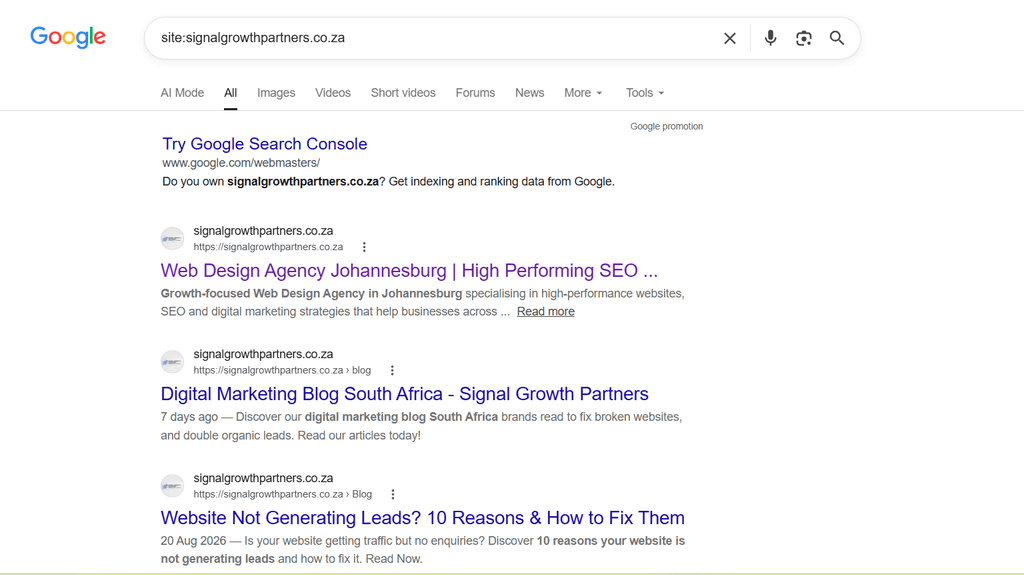
If you’re trying to find the cause yourself, work through the problem systematically.
Step 1: Check whether the page is indexed
Use Google Search Console to inspect important URLs.
If the page isn’t indexed, investigate that before worrying about its position.
Step 2: Identify the search you’re trying to rank for
Be specific.
Instead of saying:
“My website isn’t ranking.”
identify the actual search:
“My website isn’t ranking for ‘accountants in Pretoria.'”
That gives you something measurable to investigate.
Step 3: Search the keyword
Look at the results.
What types of pages are appearing?
Are they service pages, guides, product pages, directories, local businesses or something else?
This can reveal what type of content Google believes best satisfies the search.
Step 4: Compare your page with the results
Don’t copy competitors.
Instead, identify what information users may be getting elsewhere that your page doesn’t provide.
Step 5: Check technical SEO
Look for indexing, crawling, broken-link, redirect, sitemap and structural problems.
Step 6: Check mobile usability and performance
Visit the website as a customer would.
Is anything slow, confusing or difficult to use?
Step 7: Review internal links
Make sure important pages are connected logically throughout the website.
Step 8: Look at authority
Consider whether your business has legitimate mentions, links, reviews and recognition relevant to its industry and location.
Step 9: Check Search Console data
Look beyond rankings.
Impressions, clicks and search queries can reveal problems that aren’t obvious from manually searching Google.
Step 10: Prioritise the biggest problems
Don’t change 30 things at once.
Identify the problems most likely to affect visibility and work through them systematically.
Why You’re Not Seeing Your Website Doesn’t Always Mean It Isn’t Ranking
There is one more important issue to understand.
Your personal Google search isn’t a complete picture of your website’s performance.
Search results can vary based on factors such as location, device, search history and the specific query being used.
You might search for your business from your office and not see the same results as someone searching from another area.
This is particularly important for local businesses.
Instead of relying solely on manual searches, use data from tools such as Google Search Console and, where relevant, local search and business-profile data.
You should also look at trends over time.
A website moving from:
No visibility → impressions → page 3 → page 2 → page 1
is making progress, even if it isn’t ranking #1 yet.
SEO should therefore be evaluated as a process rather than based on one search performed on one day.
How Long Does It Take for a Website to Rank on Google?
There isn’t a universal timeframe.
The answer depends on factors including:
- How established the website is
- How competitive the search is
- The quality and relevance of the content
- Technical SEO
- The website’s authority
- The competitiveness of the industry
- The location being targeted
- How consistently the website is improved
A low-competition local search may be much easier to compete for than a highly competitive national keyword.
This is why anyone promising that they can guarantee a #1 Google ranking should be treated cautiously.
Good SEO involves testing, measuring, improving and adapting.
When Should You Get an SEO Audit?
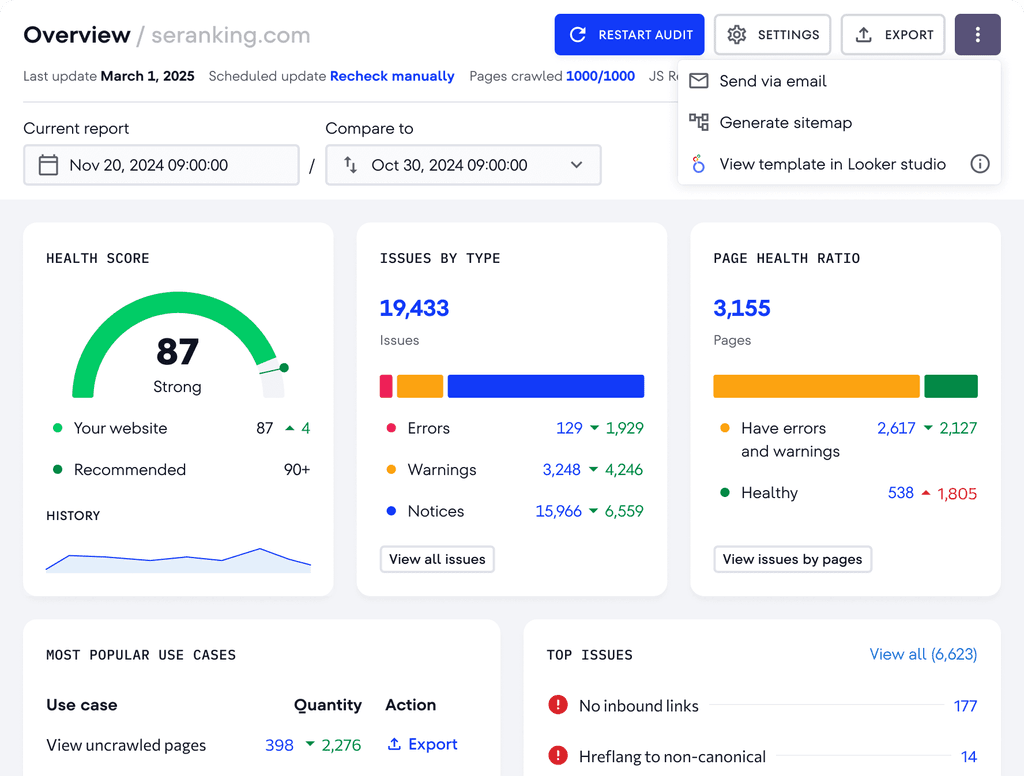
If you’ve checked the obvious issues and still can’t determine why your website isn’t gaining visibility, an SEO audit can provide a more structured diagnosis.
An audit can examine areas such as:
- Indexing and crawling
- Technical SEO
- Keyword targeting
- Search intent
- On-page optimisation
- Content quality
- Internal linking
- Website structure
- Competitor performance
- Local SEO
- Authority and backlinks
- Search Console data
The purpose shouldn’t be to produce a huge list of technical jargon.
A useful SEO audit should help answer three practical questions:
What is wrong?
Why does it matter?
What should be fixed first?
That prioritisation is often more valuable than simply receiving a spreadsheet containing hundreds of SEO issues.
Final Thoughts: Why Is Your Website Not Ranking on Google?
If your website isn’t ranking on Google, don’t immediately assume you need more keywords or hundreds of backlinks.
The underlying problem could be much simpler.
Your page might not be indexed.
Your content might not match search intent.
You could be targeting overly competitive keywords.
Your website might have technical problems.
Your important pages may not have enough useful supporting content.
Or you may have built a good website but haven’t yet developed enough authority to compete with established businesses.
The most effective approach is to diagnose the problem before trying to fix it.
Check indexing. Understand the search intent. Review your content. Investigate technical SEO. Look at your internal links. Assess your authority. Then use real search data to decide what deserves attention.
Most importantly, remember that SEO isn’t about making a website look optimised to a search engine.
It’s about making your website the best possible result for the people you want to reach.
If you’ve worked through these checks and still can’t determine what’s preventing your website from gaining visibility, an SEO professional can help you identify the underlying problems, prioritise the work and develop a strategy based on your business, audience and search competition.
