

Your online store can have great products, competitive prices and a professional website, yet still struggle to attract customers. If people cannot find your products when they search on Google, you could be missing opportunities to turn relevant searches into sales.
For South African ecommerce businesses, getting found online involves more than adding keywords to product descriptions. Your website needs to help search engines discover your products, understand what you sell and present useful information to potential customers.
If you’re still planning your online store, it’s worth understanding the cost of building an ecommerce website in South Africa before investing in design, development and marketing. Once your store is ready, ecommerce SEO can help potential customers discover your products through Google.
Ecommerce SEO helps improve the visibility of your online store in unpaid search results. It combines technical optimisation, product and category page improvements, useful content and a website experience that makes it easier for shoppers to find what they need.
In this guide, we explain how to improve ecommerce SEO in South Africa, from optimising individual product pages to helping Google understand your prices, stock availability and delivery information.
What is ecommerce SEO?
Ecommerce SEO is the process of improving an online store so that its product pages, category pages and supporting content can appear for relevant searches on Google and other search engines.
For example, a South African customer might search for:
- Handmade baby shower gifts in South Africa
- Affordable running shoes online
- Personalised flower bouquets in Pretoria
- Where to buy skincare products online
- Laptop bags with nationwide delivery
Each search represents a different need. Some customers are researching their options, while others are ready to buy.
An effective ecommerce SEO strategy helps your store appear for searches that match the products you sell and the questions your customers ask.
Unlike paid advertising, organic SEO does not charge you for every click from a search result. However, SEO still requires investment in content, technical improvements, monitoring and ongoing optimisation. Rankings and traffic are not guaranteed.
Why ecommerce SEO matters for South African online stores
South Africa’s ecommerce market continues to create opportunities for businesses selling online. The Online Retail in South Africa 2026 report, produced by World Wide Worx with industry partners, projected that online retail sales would reach approximately R159 billion in 2026.
This growth creates opportunities, but it also means businesses need to compete for shoppers’ attention.
Source: World Wide Worx — Online Retail in South Africa 2026.
When potential customers search for products you sell, your store needs to provide a clear reason for Google to consider its pages relevant and a clear reason for shoppers to choose your business.
Ecommerce SEO can help you:
- Reach customers with buying intent: Target searches related to your actual products, categories and customer needs.
- Build visibility beyond social media: Help people discover your store even when they are not following your social accounts.
- Create a stronger shopping experience: Make product information, pricing, delivery details and navigation easier to understand.
- Support long-term acquisition: Build organic visibility that can continue to attract relevant visitors over time.
- Compete more strategically: Focus on specific product categories and search opportunities rather than trying to rank for every possible term.
The objective is not simply to increase website traffic. It is to attract people who are genuinely interested in what your business offers.
1. Start with the keywords your customers actually use
One of the most common ecommerce SEO mistakes is optimising every product page around a broad keyword such as “clothing”, “skincare” or “gifts”.
These terms may describe your products, but they do not always communicate a specific buying need.
Instead, identify the phrases customers might use when looking for your products.
Understand the three main types of ecommerce searches
Broad category searches
Examples: women’s running shoes, baby products online, office furniture.
These searches often indicate that customers are exploring a category and comparing options.
Specific product searches
Examples: waterproof women’s trail running shoes, organic cotton baby blankets, ergonomic office chairs.
These searches provide more detail about what the shopper wants.
Problem-solving and comparison searches
Examples: which baby bag is best for travelling, how to choose a desk chair for back support, what flowers last longest in summer.
These searches are useful opportunities to publish helpful content that introduces shoppers to your products.
How to find ecommerce keywords
Start with the products and categories that matter most to your business.
- Write down your main product categories and best-selling products.
- Search for each product phrase on Google and examine the relevant results.
- Note the related searches and questions that appear.
- Use Google Search Console to identify queries that already generate impressions for your website.
- Use keyword research tools to compare search demand, competition and related terms.
- Group similar searches according to the page that best satisfies the shopper’s intent.
For example, a florist selling online might target “flower delivery Pretoria East” on an appropriate delivery or location page, while a specific bouquet page could target a phrase describing that arrangement.
Do not force every keyword onto one page. A category page should help customers browse a range of products, while a product page should explain one particular item or its variants.
Practical tip: Prioritise keywords that match your inventory, margins, delivery capabilities and customers. Ranking for a popular search is of limited value if your store cannot satisfy the person searching.
2. Optimise product pages to help Google and shoppers understand your products

Your product page is more than a place to display an image and a price. It should answer the questions a customer needs resolved before buying.
A weak page might contain a product name, one photograph and a short description copied from a supplier. A stronger page explains what the product is, who it is for, what makes it useful and what the customer can expect when ordering.
Write descriptive product titles
A good product title should be specific, natural and accurate.
Instead of:
“Baby Bag”
Consider:
“Water-Resistant Baby Nappy Bag with Multiple Compartments”
Only use these details if they accurately describe the item.
Include important product attributes where relevant, such as size, material, colour, model or intended use. Avoid stuffing several similar keywords into the same title.
Create original product descriptions
Supplier descriptions are convenient, but if dozens of stores publish identical wording, your page may offer little additional value.
Write descriptions that help customers make a decision.
Depending on the product, include:
- Key features and practical benefits
- Dimensions, materials, ingredients or specifications
- Available colours, sizes and variants
- Care instructions or compatibility information
- What is included with the purchase
- Suitable use cases and limitations
For example, a reusable water bottle description could explain its capacity, material, cleaning instructions and whether it fits standard cup holders.
Do not invent product benefits, certifications, performance claims or customer experiences. Accurate information helps build trust and reduces the risk of customers receiving something different from what they expected.
Improve product images
Product images influence both how shoppers evaluate an item and how search engines understand the page.
Use clear, high-quality images that show the actual product. Where appropriate, include different angles, close-up details, scale references and photographs showing the product in use.
Give image files descriptive names before uploading them, and write useful alternative text that describes what each image shows. Avoid repeating keywords unnaturally in every image description.
For example:
water-resistant-baby-nappy-bag-black.jpg
Alternative text could be:
“Black water-resistant baby nappy bag with multiple storage compartments.”
Compress images appropriately and use responsive image formats where supported so that visual quality does not come at the expense of loading speed.
Make essential buying information easy to find
For South African shoppers, clearly display:
- Price in South African rand where applicable
- Current stock availability
- Delivery areas and estimated delivery times
- Shipping costs and free-delivery conditions, if offered
- Payment options
- Returns, refunds and exchange policies
- Contact details for customer support
These details help shoppers assess whether they can buy from you confidently. They also support accurate product information across your website and eligible Google shopping experiences.
3. Optimise category pages, not just individual products
Product pages are important, but category pages can also attract valuable searches.
Imagine an online store selling skincare. Individual products might include moisturisers, cleansers and serums. A well-organised skincare category page can help shoppers explore the range and may target broader category searches.
A useful category page should include:
- A descriptive heading that explains the category
- A short introduction that helps customers understand the available products
- Relevant filters and sorting options
- Clear product names, images and prices
- Helpful buying guidance where it adds value
- Links to relevant subcategories and products
Avoid adding long blocks of generic text simply to increase word count. The content should support the shopping decision rather than push products unnecessarily far down the page.
Your category structure should also reflect how customers think about your products. If shoppers struggle to navigate the store, search engines may also have difficulty understanding the relationships between its pages.
4. Help Google discover and index your products
A product can be well written and still receive little organic visibility if Google cannot reliably discover or index its page.
Crawling, indexing and ranking are different processes:
- Crawling: Google accesses a page to examine its content.
- Indexing: Google evaluates the page and may store it in its search index.
- Ranking: Google determines where the page may appear for a particular search.
Submitting a URL does not guarantee that it will be indexed or ranked.
Check your website structure
A sensible ecommerce structure makes it easy for shoppers and search engines to move between the homepage, categories, subcategories and product pages.
For example:
Homepage → Baby Products → Nappy Bags → Individual Nappy Bag
Use descriptive internal links so Google can discover important products through normal navigation.
Review your XML sitemap
Your XML sitemap should help search engines discover the important, indexable URLs on your website.
Check that your sitemap includes the correct canonical product and category URLs and does not unnecessarily include pages that should not be indexed.
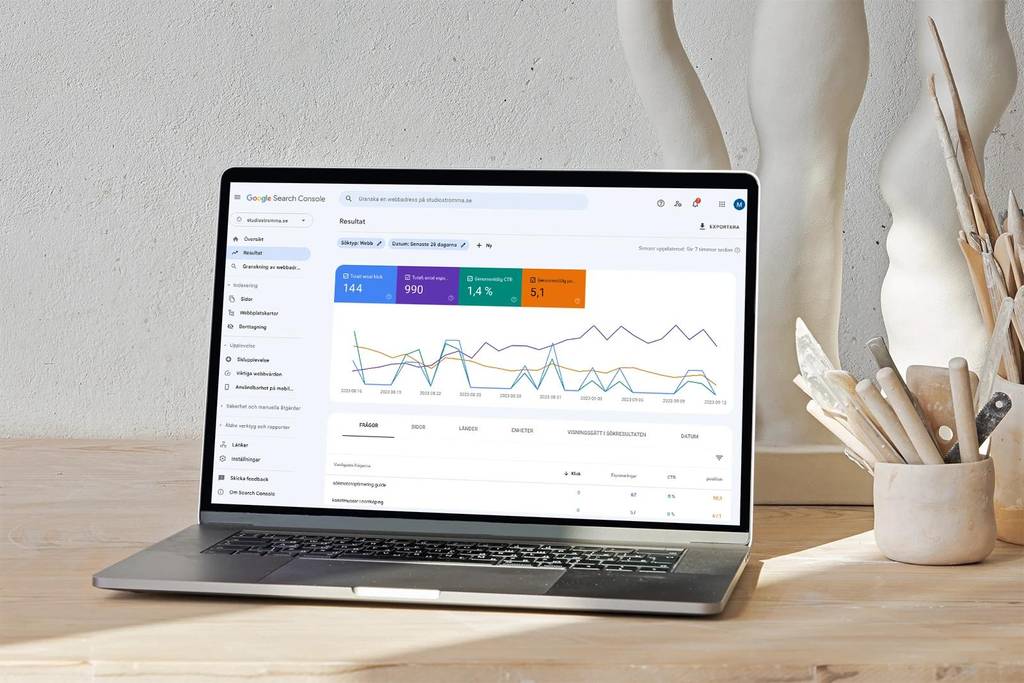
Check for indexing problems
Use Google Search Console to inspect important product URLs. Look for issues involving:
- Pages excluded from indexing
- Accidental
noindexdirectives - Incorrect canonical URLs
- Blocked resources or crawl restrictions
- Product pages that cannot be reached through internal links
- Duplicate or near-duplicate URLs
Ecommerce sites can generate many URLs through filters, sorting options, product variants and tracking parameters. If these are not managed carefully, they can create duplication and make crawling less efficient.
Google provides dedicated guidance on ecommerce website structure, crawling and indexing.
5. Use product structured data to make product information clearer
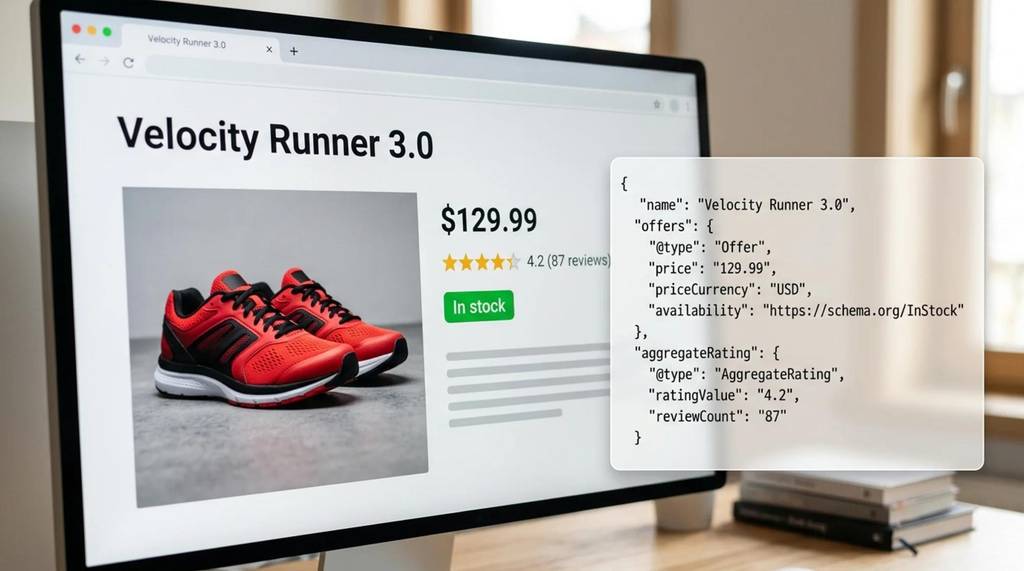
Structured data, often called schema markup, is code that describes information on a webpage in a format search engines can interpret.
For an ecommerce store, appropriate product structured data can help Google understand information such as a product’s name, price, availability and review details where applicable.
It can also make eligible pages candidates for enhanced search appearances, including certain product snippets and merchant listing experiences.
Which structured data should an online store use?
Depending on how your store operates, relevant options include:
- Product: Describes the individual product.
- Offer: Provides details about an offer, such as price and availability.
- Product reviews and aggregate ratings: Used when genuine, eligible review information is available and displayed appropriately.
- Organisation information: Helps describe the business behind the store.
- Merchant return policy information: Can communicate applicable business return policies through supported structured data.
For a store where customers purchase directly, merchant listing structured data is particularly relevant.
Make sure the structured data reflects what customers can actually see on the page. Prices, currency, stock status and review information should be accurate and kept up to date. Never create fake ratings or mark up information that is not supported by the page.
If your website runs on WooCommerce or another ecommerce platform, an appropriate plugin may generate some of this markup automatically. However, automated markup still needs to be checked.
Use Google’s Merchant Listings structured data guide and Rich Results Test to review your implementation.
Important: Structured data does not guarantee a rich result or a higher ranking. It helps Google interpret eligible content, but Google decides which search appearances to show.
6. Make your ecommerce website fast and mobile-friendly
Customers may discover your products on a phone while travelling, comparing prices or browsing social media links. If your website is slow, difficult to navigate or frustrating to use on a small screen, you risk losing potential sales.
Mobile usability should be considered throughout the shopping journey, from landing on a product page to completing checkout.
Review the following:
Page speed: Compress images, minimise unnecessary scripts and review hosting performance.
Mobile layout: Make product information, navigation, filters and purchase buttons usable on smaller screens.
Core Web Vitals: Monitor loading performance, interaction responsiveness and visual stability using Google’s tools.
Checkout usability: Reduce unnecessary steps and make errors easy to identify and correct.
Security: Use HTTPS and keep your ecommerce platform, themes and plugins maintained.
Google’s Core Web Vitals guidance explains the metrics used to assess important aspects of page experience.
A technically sound website does not automatically rank first, but a poor technical foundation can undermine both search visibility and the customer experience.
7. Treat delivery, returns and trust as part of the buying experience
Ecommerce SEO is not only about search engines. A shopper who discovers your product still needs enough information to decide whether your business is a suitable place to buy.
For a South African online store, this may mean explaining whether you deliver nationwide, which courier options are available, what delivery costs, and how long customers should expect to wait.
If you offer collection, specify the collection arrangements. If you sell products that require special handling or have regional restrictions, explain those limitations clearly.
Also make it easy for customers to find:
- Your business contact information
- Secure payment information
- Returns and refund terms
- Product guarantees, where applicable
- Genuine customer reviews
- Answers to common purchasing questions
Do not claim to offer nationwide delivery, same-day shipping or a particular payment option unless your business actually provides it.
These details are useful because they reduce uncertainty. They also help create a more complete and credible shopping experience, which supports the overall quality of your online store.
8. Use helpful content to attract customers before they are ready to buy
Not every customer begins with a product search. Some start with a problem, a question or a comparison.
A store that publishes genuinely helpful content can reach potential buyers earlier in their decision-making process.
For example, an online baby store could publish an article about choosing a nappy bag for travel. A florist could explain how to choose flowers for different occasions. A skincare store could provide a guide to understanding common skincare ingredients, with appropriate care not to make unsupported medical claims.
Useful content formats include:
- Buying guides
- Product comparisons
- Care and maintenance instructions
- Frequently asked questions
- Size and compatibility guides
- Seasonal shopping guides
- Practical tutorials related to your products
The important part is relevance. Do not publish unrelated articles merely to increase the number of blog posts on your website.
Connect blog content to relevant products
Suppose you publish a guide to choosing a practical baby bag. Link naturally to the relevant nappy bag category and products so readers can explore suitable options.
Likewise, a product page can link to a helpful guide when customers need more information before purchasing.
Use descriptive anchor text and link only where the destination genuinely helps the reader. This improves navigation and helps search engines understand the relationships between your pages.
Content should answer the reader’s question first. Product promotion should follow naturally when it is relevant.
9. Consider Google Merchant Center and free product listings
Organic website SEO and Google Shopping visibility are related, but they are not identical.
Google Merchant Center allows eligible retailers to provide product data to Google. Depending on eligibility, data quality and Google’s policies, products may be able to appear in free listings across supported Google surfaces.
For an ecommerce business, this can create another route for customers to discover products beyond traditional blue-link search results.
To get started:
- Review the eligibility and policies for your business and products.
- Set up Google Merchant Center and verify your website as required.
- Submit accurate product information through a supported method.
- Check product identifiers, pricing, availability and landing-page consistency.
- Monitor diagnostics and resolve disapprovals or data errors.
- Keep product feeds updated when prices or stock levels change.
Where relevant, provide accurate shipping and return information and ensure that the website meets Google’s requirements.
Free listings are not guaranteed placements, and availability can depend on the product, country, account and applicable policies.
For current requirements, refer to Google Merchant Center and Google’s ecommerce SEO documentation.
10. Measure whether your ecommerce SEO is working
An increase in impressions can be encouraging, but it does not necessarily mean your store is generating more sales.
Track performance using Google Search Console, Google Analytics and your ecommerce platform’s reporting tools.
Focus on metrics that help you understand what customers are doing.
| Metric | What it helps you understand |
|---|---|
| Search impressions | How often your pages appear in Google Search |
| Organic clicks | How many visits arrive through unpaid search results |
| Click-through rate | How often people click after seeing a search result |
| Search queries | Which searches generate visibility for your pages |
| Product page engagement | How visitors interact with important product pages |
| Add-to-cart activity | Whether visitors are showing purchase intent |
| Organic conversions | Whether organic visitors complete valuable actions |
| Revenue from organic traffic | How organic search contributes to sales |
Compare performance over meaningful periods, taking seasonality, promotions, product availability and changes to your website into account.
For example, if a product category receives impressions but very few clicks, review its search intent, title and description in search results. If it attracts clicks but generates few purchases, investigate product pricing, delivery costs, page usability, stock availability and checkout friction.
Use the evidence to decide what to improve next rather than making changes based on rankings alone.
Common ecommerce SEO mistakes to avoid
Some issues repeatedly limit the value businesses get from ecommerce SEO.
Copying supplier descriptions across the catalogue. Add original, useful information where it helps shoppers make informed decisions.
Optimising every page for the same keyword. Give each important page a clear purpose and target the searches it can satisfy best.
Ignoring category pages. Category pages can be valuable destinations for shoppers looking to compare several products.
Uploading large, unoptimised images. Maintain image quality while reducing unnecessary file sizes.
Leaving discontinued products unmanaged. Decide whether a page should remain available, point to a suitable replacement or return an appropriate status based on the situation.
Allowing filters to generate uncontrolled URLs. Review how sorting, filters and variants affect crawling, indexing and duplicate content.
Using inaccurate product structured data. Keep markup consistent with the visible product information.
Publishing content without a purpose. Every article should meet a genuine customer need and connect logically to the products or categories you sell.
Expecting immediate results. SEO takes time, and improvements should be assessed through sustained measurement rather than promises of instant rankings.
How long does ecommerce SEO take to work?
There is no fixed timeline for ecommerce SEO.
The time required to see meaningful improvements depends on factors such as your website’s current condition, competition, the number of products, the quality of your content, technical issues and how frequently Google crawls and re-evaluates your pages.
A newer store may first need to establish its technical foundation and help Google discover its important pages. An established store may have opportunities to improve existing product pages, resolve indexing issues or strengthen category content.
Measure progress through improvements in indexing, relevant impressions, organic clicks and conversions. Do not judge the entire strategy by one keyword or a short reporting period.
A practical ecommerce SEO checklist for South African businesses
If you want to improve your store’s visibility, start with these priorities.
- Identify the products and categories that matter most to your business.
- Research the actual search terms your customers use.
- Improve product titles and write useful, accurate descriptions.
- Optimise category pages and internal links.
- Check that important product URLs can be crawled and indexed.
- Review your XML sitemap and canonical URLs.
- Optimise product images and mobile page performance.
- Display clear prices, delivery terms, stock information and returns policies.
- Validate product structured data.
- Review Google Merchant Center eligibility and product data.
- Publish helpful content that answers relevant buying questions.
- Monitor organic traffic, add-to-cart activity and sales.
You do not have to tackle every issue at once. Start with the products and pages most likely to contribute to your business goals, then work through the technical and content improvements in order of importance.

Make your ecommerce website easier to find
Getting your products found on Google requires more than adding keywords to a website. Your store needs a clear structure, useful product information, reliable technical performance and a shopping experience that answers customers’ questions.
For South African ecommerce businesses, the strongest approach is to connect these elements with a practical SEO strategy: understand what your customers search for, make your products easy to discover, provide accurate buying information and measure what leads to meaningful results.
Building a successful online store starts with the right foundations. If you’re budgeting for a new store, read our guide to ecommerce website costs in South Africa to understand the factors that influence your investment. You can then plan your SEO strategy around helping the right customers find your products.
At Signal Growth Partners, we help businesses build and improve their digital presence through website design, SEO and digital marketing.
Explore our ecommerce website design services in Johannesburg to learn how we can help you create an online store built around your products, customers and business goals.
Build a store that gives your products a better opportunity to be discovered.
