


You could be paying Google every time someone clicks your advertisement, but how many of those people are actually looking for what your business offers?
For many businesses, the problem with Google Ads isn’t necessarily the advertising budget. It’s the searches triggering their advertisements.
Imagine running a Google Ads campaign for a plumbing company in Johannesburg. You want to reach businesses looking for professional plumbing services. However, your ads are also appearing for searches such as “free pumbling tips”, “plumbing hacks” and “how to fix your drainage”.
Those searches might generate clicks, but are those people likely to become paying customers?
Probably not.
This is where the Google Ads Search Terms Report becomes particularly useful. It allows advertisers to see which searches triggered their advertisements and evaluate whether their advertising budget is reaching the right audience.
If your Google Ads campaigns are generating traffic without enough meaningful enquiries, understanding your search terms is one of the first places to start.
In this guide, we’ll explain how to find wasted ad spend, identify irrelevant searches, use negative keywords and make more informed campaign optimisation decisions.
What Are Google Ads Search Terms?
A search term is the actual word or phrase someone enters into Google when looking for information, products or services.
A keyword, on the other hand, is what an advertiser adds to their Google Ads campaign to help determine which searches can trigger their advertisements.
These two terms are related, but they are not the same.
For example, a Johannesburg web design company might target the keyword:
“Web design services”
However, its advertisements could appear for searches such as:
- Website design companies near me
- Affordable website designers Johannesburg
- Free website builders
- Website design courses
- How to design a website yourself
Some of these searches indicate commercial interest. Others suggest that the person is looking for free resources or educational information rather than professional services.
This distinction matters because Google Ads uses keyword matching and other signals to determine which searches are eligible to trigger advertisements.
The Search Terms Report helps you understand what is happening beyond the keywords you originally selected.
Why You Should Regularly Check Your Google Ads Search Terms
Launching a Google Ads campaign is not the end of the work. Search behaviour changes, new queries emerge and your advertisements may attract people whose needs don’t match your services.
Without reviewing search terms, you could continue paying for traffic that has little commercial value.
Here are four reasons to make search term analysis part of your advertising routine.
1. Identify irrelevant clicks
Not everyone clicking your advertisement is a potential customer.
For example, if you offer paid website design services, you probably don’t want to spend your budget attracting people searching exclusively for free templates, website design jobs or training courses.
Identifying these searches helps you understand where your campaign may be attracting the wrong audience.
2. Discover negative keyword opportunities
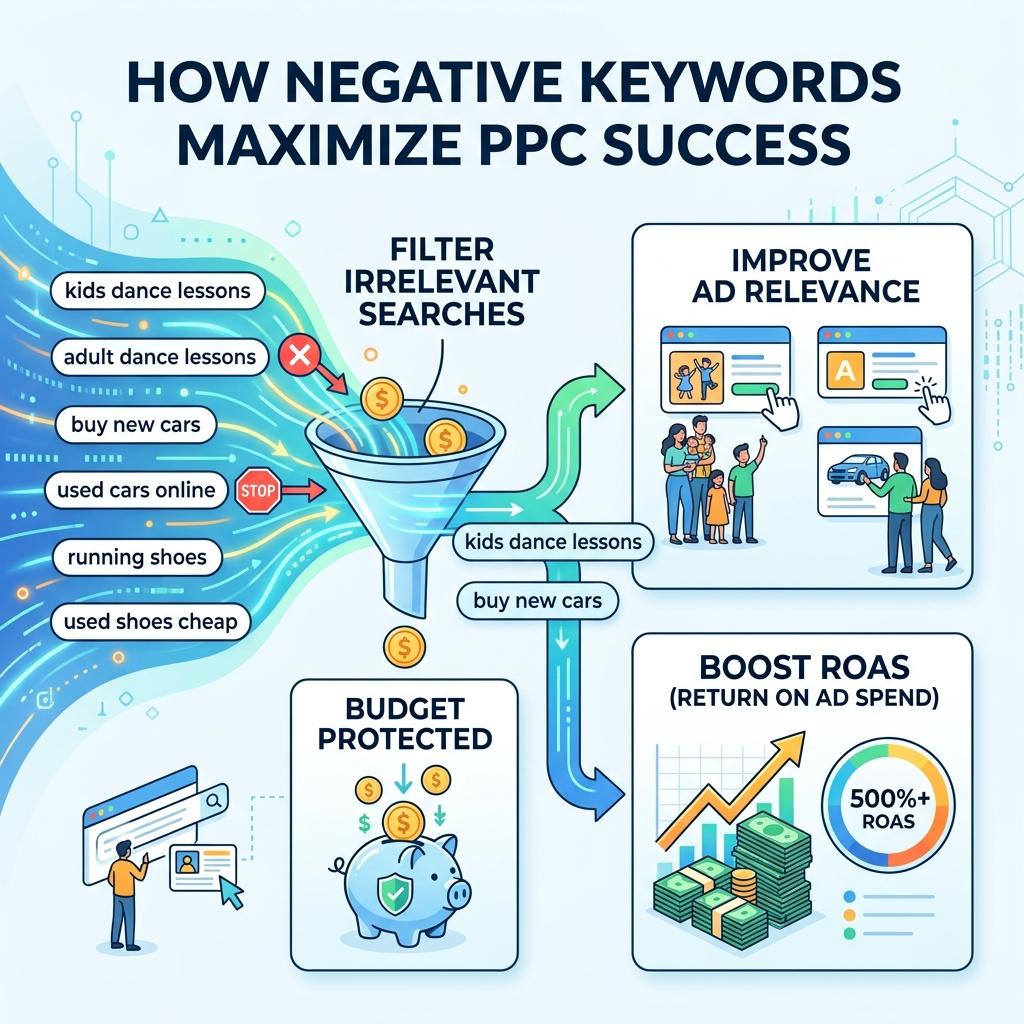
Negative keywords tell Google which searches you don’t want your advertisements to appear for.
For example, a business offering professional SEO services might consider excluding terms such as “free SEO course” or “SEO jobs” if those searches are consistently irrelevant to its commercial offering.
The important thing is to exclude searches based on their relevance to your actual business, not simply because they contain unfamiliar words.
3. Understand customer search behaviour
Your customers might not search using the exact phrases you expected.
Someone looking for professional website design might search for a web developer, a website company or a business website specialist.
Reviewing actual searches can help you discover relevant opportunities that your original keyword research may have missed.
4. Make your advertising budget work harder
Every advertising rand should have a clear purpose.
If your campaign attracts irrelevant searches, you may be paying for clicks that have little chance of generating business.
Removing genuinely irrelevant traffic can help improve targeting and make more of your available budget accessible to searches that match your services.
However, remember that not every click that fails to convert immediately is wasted. Some customers research before making a decision, and conversion tracking or sales follow-up can also affect the results you see.
How to Find Wasted Ad Spend Using the Google Ads Search Terms Report
You don’t need to be an experienced PPC specialist to start understanding your search terms. Google Ads provides reporting tools that help you investigate the searches triggering your campaigns.
Here’s how to get started.
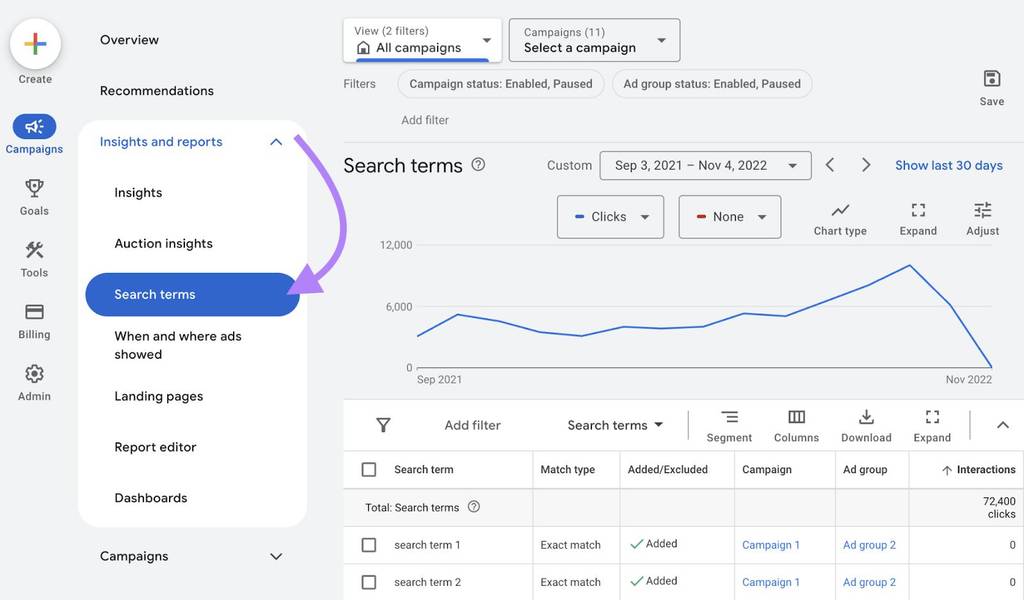
Step 1: Open Your Google Ads Search Terms Report
Log in to your Google Ads account.
From the left-hand navigation:
- Select Campaigns.
- Open Insights and reports.
- Select Search terms.
- Choose the campaign or account you want to investigate.
- Select an appropriate date range.
You should now be able to review the search terms that triggered your advertisements and the available performance data.
Google also provides a guide to understanding the Search Terms Report.
Keep in mind that the report doesn’t necessarily show every single search made by every user. Google limits the visibility of some lower-volume searches to protect user privacy.
Step 2: Review the Search Terms That Generated Clicks
Start by looking at the actual searches rather than immediately focusing on your keyword list.
Ask yourself:
- Is this person looking for something we actually offer?
- Does the search suggest buying or enquiry intent?
- Is the person looking for information rather than a service?
- Would this search realistically generate a customer for our business?
For example, consider a company advertising professional website development.
| Search term | Likely relevance |
|---|---|
| Website design Johannesburg | High |
| Professional web developer | High |
| Ecommerce website development | High, if offered |
| Free website templates | Low |
| Web design jobs | Low |
| Website design course | Low |
The purpose is not to eliminate every search that doesn’t look exactly like your target keyword.
It is to identify searches that don’t align with your business objectives.
Step 3: Compare Search Terms Against Their Performance
This is where the real analysis begins.
A search term might look relevant but still perform poorly. Another might have a relatively high cost per click but generate valuable enquiries.
Review the available metrics, including:
Clicks: How many people clicked your advertisement after searching for that term?
Cost: How much advertising spend was attributed to those clicks?
Conversions: How many tracked conversion actions were recorded?
Conversion rate: What proportion of relevant ad interactions resulted in conversions, according to the reporting definition?
Cost per conversion: How much did you spend to generate each recorded conversion?
Impressions: How often did your advertisement appear for the search.
Don’t make decisions based on one metric in isolation.
For example, a search term with 15 clicks and no conversions might initially look like wasted spend. However, if your typical sales cycle is several weeks, it may be too early to make that conclusion.
On the other hand, 100 clicks from people searching for free services could be a much clearer indication of a targeting problem.
Step 4: Identify Searches That Should Be Excluded
Once you’ve identified genuinely irrelevant search terms, consider adding them as negative keywords.
For example, a company providing paid digital marketing services might consider excluding searches related to:
- Free marketing courses
- Digital marketing jobs
- Marketing internships
- Free website builders
- Marketing tutorials
These are examples, not a universal negative keyword list. Whether a term should be excluded depends on the business and its offering.
A company offering digital marketing training, for example, might actually want to target course-related searches.
Always consider the intent behind the search before excluding it.
Step 5: Add Negative Keywords to Your Campaign
Google Ads allows you to add negative keywords directly from the Search Terms Report.
The general process is:
- Select the irrelevant search terms.
- Choose the option to add them as negative keywords.
- Decide whether to apply them at campaign level, ad group level or through a negative keyword list.
- Review the match type.
- Save your changes.
Negative keywords can be applied using different match types, including broad, phrase and exact match.
These match types work differently from positive keyword matching. Negative keywords don’t automatically cover every close variation, synonym or related phrase.
For this reason, review your exclusions carefully.
A negative keyword that’s too broad could prevent your advertisement from appearing for searches that might actually generate business.
Google explains the process in its official guide to adding negative keywords from the Search Terms Report.

Understanding When a Search Term Is Actually Wasting Money
One of the biggest mistakes advertisers make is assuming that every search term with no conversions should be excluded.
That isn’t necessarily true.
Consider these three situations.
Scenario 1: Irrelevant search intent
Your business offers paid SEO services, but your advertisements appear for “free SEO training”.
The searcher is probably looking for educational resources rather than someone to manage their company’s SEO.
If this search is consistently irrelevant to your offering, adding an appropriate negative keyword may make sense.
Scenario 2: Relevant searches with no conversions yet
A person searches for “SEO services Johannesburg”, clicks your advertisement and visits your website.
They don’t complete an enquiry form.
That doesn’t automatically mean the click was wasted.
They may be comparing providers, researching pricing or planning to contact you later.
Before excluding this search, investigate the landing page, conversion tracking, sales cycle and available performance data.
Scenario 3: Expensive searches with poor lead quality
Your business receives enquiries from people searching for your services, but most cannot afford your offering or aren’t suitable customers.
Here, the issue may not be irrelevant search terms alone.
Your advertisement might be attracting the wrong expectations, or your landing page might not communicate your pricing, service scope or ideal customer clearly enough.
The solution could involve adjusting your ad messaging, targeting and landing page rather than simply adding negative keywords.
This is why proper Google Ads optimisation requires more than deleting expensive search terms.
Don’t Ignore Search Terms Insights and AI-Powered Campaign Changes
Google Ads continues to introduce more automation into its advertising platform.
Features such as broad match, Performance Max and AI Max give Google’s systems more opportunities to interpret search intent and identify relevant audiences.
This creates opportunities to reach potential customers, but it also makes campaign monitoring important.
Search Terms Insights can help advertisers understand broader search themes and categories, including aggregated activity that may not appear as individual queries in the Search Terms Report.
You can find these insights under the Insights section of Google Ads.
They can help you identify:
- Search categories attracting traffic.
- Themes associated with conversions.
- Changes in customer search behaviour.
- Opportunities to improve ad messaging and landing pages.
- Areas where your campaigns may be attracting irrelevant interest.
For a closer look at Google’s evolving automation features, read our guide: AI Max for Google Ads Explained.
Automation can help advertisers discover additional opportunities, but it doesn’t remove the need for a clear strategy, reliable conversion tracking and regular performance reviews.
Other Places to Look for Wasted Google Ads Spend
The Search Terms Report is an excellent starting point, but it isn’t the only place where advertising inefficiencies can occur.
If your campaigns aren’t generating the results you expect, investigate these additional areas.
1. Location targeting
Are your advertisements reaching people in areas where you actually operate?
A Johannesburg service provider may not benefit from paying for clicks from people located in areas it cannot serve.
Review your location settings and location performance. Also check whether you’re targeting people physically present in your chosen locations or using broader location-related interest settings.
2. Landing page relevance
A relevant search and well-written advertisement can still produce poor results if the visitor arrives on an unsuitable webpage.
For example, someone searching for Google Ads management should ideally land on a page explaining that service, rather than having to navigate a generic homepage.
Your landing page should match the promise made in the advertisement and provide a clear next step.
Read our guide on Google Ads Landing Pages: What Makes One Convert?.
3. Conversion tracking
Without reliable conversion tracking, you may struggle to determine which campaigns, keywords and search terms are generating meaningful actions.
Make sure important actions are measured correctly, including relevant enquiry submissions, purchases and calls where appropriate.
For lead-generation businesses, remember that a form submission is not necessarily a qualified lead.
Where possible, connect advertising performance with actual sales outcomes.
4. Campaign structure
If one campaign targets several unrelated services, it may become difficult to understand which searches and advertisements are performing well.
Organise campaigns and ad groups around meaningful service categories, customer needs and advertising objectives.
This can also help you create more relevant advertisements and landing pages.
5. Device performance
Review how your campaigns perform across mobile, desktop and tablet devices.
If a large percentage of your traffic comes from mobile users but your website is difficult to navigate on a phone, you could be losing potential customers after the click.
Check the complete enquiry process on different devices.
How Often Should You Review Your Google Ads Search Terms?
There isn’t one review schedule that works for every business.
A campaign spending a significant amount each day may need more frequent monitoring than a smaller campaign with limited search volume.
As a practical starting point:
- New campaigns: Check search terms frequently during the initial learning and optimisation period.
- Established campaigns: Schedule regular weekly or fortnightly reviews, depending on traffic and spend.
- High-spend campaigns: Monitor more frequently, particularly when targeting broad or changing search themes.
- After major changes: Review search terms and conversion performance to understand the impact.
Also compare performance over meaningful time periods rather than making decisions based on a handful of clicks.
The objective is to identify patterns, protect your advertising budget and discover opportunities to attract more valuable customers.
How Much Money Could You Be Losing Through Irrelevant Clicks?
Let’s consider a hypothetical example.
A South African business spends R10,000 per month on Google Search advertising.
During the month, its campaign generates 400 clicks at an average cost of R25 per click.
After reviewing its search terms, the business identifies 60 clicks from searches that are clearly unrelated to its services.
The potential spend associated with those clicks is:
60 clicks × R25 = R1,500.
That’s R1,500 in advertising spend associated with irrelevant searches during the period.
This doesn’t mean that adding negative keywords will automatically save R1,500 every month. Search behaviour, auctions and campaign performance change over time.
However, it demonstrates why search term reviews matter.
Even relatively small inefficiencies can become significant when they continue over several months.
For more information about advertising budgets and the factors affecting campaign costs, read our guide to Google Ads Costs in South Africa.
Final Thoughts: Stop Paying for the Wrong Searches
Google Ads can be an effective way to reach customers who are actively looking for your products and services.
But getting your advertisements in front of people is only part of the job.
You also need to understand what they’re searching for, whether those searches match your offering and what happens after someone clicks your advertisement.
The Search Terms Report gives you an opportunity to investigate these questions using actual campaign data.
Start by reviewing your search terms, identifying genuinely irrelevant traffic, adding carefully considered negative keywords and checking whether your conversion tracking is measuring the actions that matter.
Most importantly, don’t confuse cheaper clicks with better advertising performance.
A campaign that attracts fewer but more relevant visitors may be considerably more valuable than one generating large amounts of inexpensive traffic.
At Signal Growth Partners, we believe Google Ads should be measured by the business opportunities it creates, not simply the number of clicks it generates.
If you’re spending money on Google Ads but aren’t sure where your budget is going, it may be time for a closer look.
Need help identifying wasted Google Ads spend?
Signal Growth Partners helps businesses improve their digital advertising through strategic campaign management, keyword targeting, conversion-focused websites and ongoing optimisation.
Explore our Google Ads Management Services or contact our team to discuss your advertising goals.
Signal Growth Partners – Get found. Build trust. Grow your business.
Frequently Asked Questions
The Google Ads Search Terms Report shows the actual searches that triggered your advertisements and provides available performance information, helping advertisers evaluate search relevance and campaign results.
Open your Search Terms Report and review the searches generating clicks and costs. Identify irrelevant searches, compare their performance and consider adding suitable negative keywords. Also investigate conversion tracking and landing page performance.
Negative keywords are terms you use to prevent your advertisements from showing for searches that aren’t relevant to your products or services. They help refine targeting and reduce unwanted traffic.
Automated targeting and matching can expose campaigns to a wider range of searches. This can uncover valuable opportunities, but advertisers should monitor search terms, conversion quality and campaign settings to maintain relevance.
